
AI for Painting Business: Quotes to Invoices, No Retyping
September 24, 2026
This video walks 1 job from the first quote to getting paid, in a demo painting shop. Every step in this post is on screen in it.
The best use of AI for painting business owners isn’t writing your ads. It’s getting the paperwork off your kitchen table.
You say the job once. The system carries it from the quote to the invoice. And the AI never touches the math.
Here’s how that works, step by step.
The problem is the evening, not the painting
Your work day is full of jobs only you can do.
You check that the tint is right. You deal with the crew member who called in sick. You handle problem after problem, and you can handle all of it.
But then you get home, and the paperwork starts.
Quotes to write. Numbers to check. Change orders to track. Invoices to send, and payments to chase.
Every one of them has to be right. A wrong number costs you money, or it costs you the customer’s trust.
A demo shop, so you can see the whole thing
I built a made-up painting company to show this. It’s called Summit Coat Painting, an interior painting shop in Calgary. It isn’t real.
It keeps its business in 6 folders. Clients, Sales, Work, Money, Crew and Context.
Your shop might need 5 folders, or it might need 7. They’re built around how you work, not a template everybody downloads.
And every price lives in 1 place, the price list. Change a price once, and every quote after that uses it.
Step 1: say the job once
In the truck, you open Claude on your phone and just talk.
“Dana Lee, 14 Birch Ave, 403-555-0142.”
The customer and the job are set up before you knock.
Then in the kitchen, you keep talking in the same chat. “Kitchen walls, 1 room, Benjamin Moore Calm, and a feature wall in Hale Navy.”
Each piece of work lands on the job as its own line.
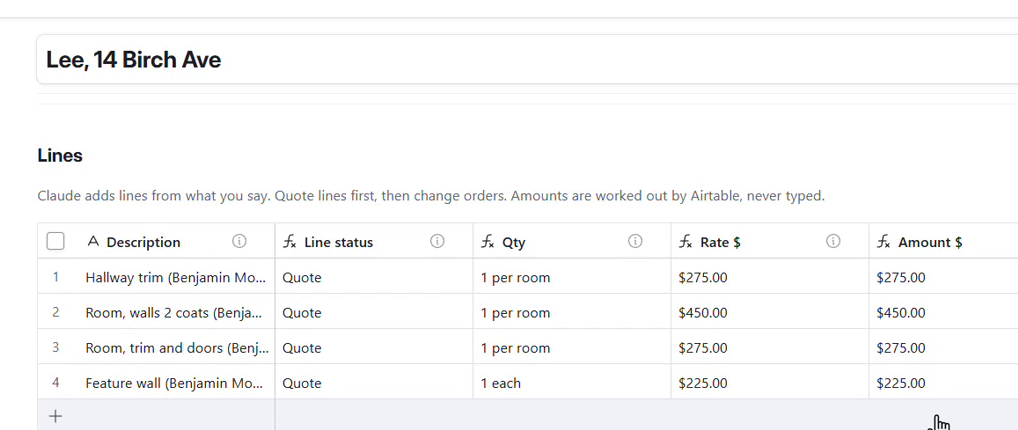
The demo job with its lines. The rates come from the price list. Claude only picked the items and quantities. See it happen at 2:27.
The system does the math, not the AI
This is the rule the whole setup is built on.
AI is great at understanding what you said. It shouldn’t be the one adding up your money.
So Claude picks 2 things for each line. The item from your price list, and the quantity. It never types a dollar amount.
Every line pulls its rate from the price list. The quote adds itself up, with the GST and the deposit. The adding is done by formulas in Airtable, the same way every time.
If a line doesn’t match the price list, it gets flagged. It won’t guess a price for you. You fix that line, and the quote is ready.
Nothing goes out until you check it
There’s a box that says you checked it. Until you tick it, the job says not ready.
Then you tick send, and the customer gets the quote by email with an approve button. They click approve, and the job moves to booked on its own. When the deposit lands, you type it in.
The emails go out through Airtable automations. The AI never sends anything. That part is yours.
Change orders that don’t get forgotten
You’re on site, and the customer asks if you can do the hallway trim while you’re here.
You say it once, and it lands on the job as a change order. The customer approves it by email, so it can’t get forgotten at billing.
A forgotten add-on is work you did for free. Watch the change order at 4:20.
The quote becomes the invoice
When the work is done, you tick job complete. The same job becomes the invoice.
Same lines. And the change order is already on it. The deposit comes off, and the balance works itself out.
No retyping. See it at 4:43.
The invoice shows the 5% GST worked out on the job. If you’re not sure how GST applies to your shop, the Canada Revenue Agency’s GST/HST pages for businesses are the place to check.
When the money lands, you type it in, and it marks itself paid.
What it saves you
Time, because you said the job once instead of typing it 3 times.
Accuracy, because the system does the math and flags what doesn’t match.
Money, because change orders can’t slip through.
And brain power, because every job remembers where it’s at.
The stuff that matters still stays yours. You set the prices. You do the work. You make the final call.
Get the same setup for your shop
The Summit Coat folders are free in my Skool community, See It · Build It · Own It. You get the 6 folders, the instructions Claude follows and the quote and invoice template, plus 3 short guides with prompts you can run on your own business.
More posts like this are on the AI the vL Way blog. If you’re new here, start on the home page.
I’m in Your Corner. Now, Go Own It.